The last three years or so I have worked mostly with mobile java, starting with Java ME and later moving into BlackBerr and Android. A lot of things has happened, three ears ago Android existed, but ther were hardly any phones available and BlackBerry did exist, but I knew nothing about it.
Today the future of Java ME is uncertain. Programming in Java is a good option on most mobile platforms (except iPhone), but the strongest alternatives are Android and BlackBerry, not Java ME.
There are of course different reasons for this. On the technical side, the User Interface options are very limited. LCDUI is very restricted, you very quickly end up with skipping the higher level API, because it is too restricted, and using the Canvas API, where you basically have to paint everything yourself. Doing input in a canvas based interface is difficult, you can react on key down and up, but the standard does not really allow you to tell if the devices even has a keyboard, or if you need to display a virtual keyboard on the screen.
An even worse problem is the fragmentation of the market. Java implementations differ, and even if it is very probable that your java me code will run on most devices (if it is well written) verifying that it does is not a smal task. And if you want it too look good it is even worse. Emulators do not help much either, verifing that something runs in the emulator does not guarantee that it will work on the device. And it is not even sure that there is an emultor for your target device.
And phone manufacturers keep making new models all the time... Apple basically has one platform and offers upgrade for old versions (sometimes free of charge, sometimes at a small charge) but the competition has not learned from this. Instead they have incompatible version on different devices, where you basically have to test on, if not all, several different versions. Just keeping up with the new models from the main manufacturers ( there are only four or five) takes a lot of time. The so called java verification does not guarantee that your application will run on all Java ME implementations with the features you need, instead you have to verify it again and again as there are new devices.
All in all this leads to that Java ME is not a good alternative for your application development today. The future of java om the mobile is rather in Android or BlackBerry. That is if not one of the major manufacturers take steps to fix this. And frankly I don't see this happening.
An exception to this is possibly Symbian. Java ME implementation on Symbian is pretty good. But it seems like Nokia is more interested in promoting development in C++, or rather the very restricted C++ available on Symbian.
Sunday, May 09, 2010


Wednesday, January 06, 2010
New Antenna release
Today I released version 1.2.1 of Antenna. The new version includes both bug fixes and new features.
I made a mistake in the 1.2.0 release, which leads to a Null Pointer Exception if the Wireless Toolkit can not be detected. Antenna can detect a lot of toolkit's, but not all, so this has given users some poblems. A patch has been in the repository for a whil, but now it is in a release also.
When the 1.2.0 release was made, ther was no Java ME SDK for Mac available, but now there is. Unfortunately the file we used in 1.2.0 to detect Java ME SDK 3.0 is not included in the Mac version, so toolkit detection fails. This is fixed in the 1.2.1 release, which should work with Java ME SDK for Mac ( I haven't tested it myself, since I don't have a mac).
The realease also includes som contributed patches:
- obfusactor arguments can now be passed to WtkPackage
- Key stor type can be set in WtkSign
- WtkRapc can build libraries
More info on antenna and the release is available here.
I made a mistake in the 1.2.0 release, which leads to a Null Pointer Exception if the Wireless Toolkit can not be detected. Antenna can detect a lot of toolkit's, but not all, so this has given users some poblems. A patch has been in the repository for a whil, but now it is in a release also.
When the 1.2.0 release was made, ther was no Java ME SDK for Mac available, but now there is. Unfortunately the file we used in 1.2.0 to detect Java ME SDK 3.0 is not included in the Mac version, so toolkit detection fails. This is fixed in the 1.2.1 release, which should work with Java ME SDK for Mac ( I haven't tested it myself, since I don't have a mac).
The realease also includes som contributed patches:
- obfusactor arguments can now be passed to WtkPackage
- Key stor type can be set in WtkSign
- WtkRapc can build libraries
More info on antenna and the release is available here.
Friday, January 01, 2010
Supporting BlackBerry touch devices
Our BlackBerry application is built using BlackBerry software version 4.5. Unfortunately this means that we can not handle touch events, since they are only supported from version 4.7. Since most of our users have 4.5 or 4.6 this is not an option. Up til now the application has had very limited functionality on touch devices like BlackBerry Storm, running in the so called *compatibility mode' with the virtual keyboard displayed all the time and only about half the screen available for our application.
But now we have made a few changes:
We upgraded the Storm device software (to version 4.7.0.181). This solved the problem with the virtual keyboard, which now can be displayed only when needed.
We revised our application. The main problem is our custom object, which did not work well. This seems to be because the navigationMovement method is not called on a touch device. Since we had some application logic in this method in our custom object, it did not work well. The solution was to move the code to the moveFocus mthod, which is called both on touch and keyborad devices.
In the long run we probably will have to provide different installations for users with 4.5/4.6 or 4.7 software version. Still we do not support more advanced touch screen usage.
But now we have made a few changes:
We upgraded the Storm device software (to version 4.7.0.181). This solved the problem with the virtual keyboard, which now can be displayed only when needed.
We revised our application. The main problem is our custom object, which did not work well. This seems to be because the navigationMovement method is not called on a touch device. Since we had some application logic in this method in our custom object, it did not work well. The solution was to move the code to the moveFocus mthod, which is called both on touch and keyborad devices.
In the long run we probably will have to provide different installations for users with 4.5/4.6 or 4.7 software version. Still we do not support more advanced touch screen usage.
Sunday, September 27, 2009
Antenna 1.2.0 with support for Java ME SDK 3.0 released
Yesterday I made the new antenna version with support for Java ME SDK 3.0 available for download. The testers have been positive so far, so it is ready for more general use.
The changes are documented in here. You will also find the matrix with toolkits ad optional libraries there, it seems like Blogger don't really like my html table...
The download is available here.
The changes are documented in here. You will also find the matrix with toolkits ad optional libraries there, it seems like Blogger don't really like my html table...
The download is available here.
Wednesday, September 23, 2009
Java Me toolkit's and support for optional JSR's
As a part of the new Antenna release I have reviewed the toolkits supported and which JSR's they support. The result is the matrix below.
As you see, many JSR's are widely supported, while others are supported only by a few manufacturers. If you need Bluetooth, PDA, Wireless Messaging, SVG or Mobile Media, they are available in most emulators. But if you need Internationalization, or Open GL your choice is more limited.
Many manufacturers have their own additional APIs. Most used is Nokia UI, which is actually also supported by Sony Ericsson.
As you see, many JSR's are widely supported, while others are supported only by a few manufacturers. If you need Bluetooth, PDA, Wireless Messaging, SVG or Mobile Media, they are available in most emulators. But if you need Internationalization, or Open GL your choice is more limited.
Many manufacturers have their own additional APIs. Most used is Nokia UI, which is actually also supported by Sony Ericsson.
| JSR API Support | Antenna property | Sun WTK 2.5 | Java ME SDK 3.0 | MOTODEV Studio for Java ME | Nokia S60 3rd Edition SDK | Nokia N97 SDK | Nokia S40 5thed | Sony Ericsson SDK 2.5 | Sprint WTK 3.3.2 | LG SDK 1.3 for Java ME |
| CLDC version | 1.0,1.1 | 1.0,1.1 | 1.1 | 1.1 | 1.1 | 1.0, 1.1 | 1.0, 1.1 | 1.0, 1.1 | 1.0, 1.1 | |
| MIDP version | 1.0,2.0,2.1 | 1.0,2.0,2.1 | 2.1(2.0) | 2.0,2.1 | 2.0,2.1 | 1.0,2.0,2.1 | 1.0,2.0,2.1 | 1.0,2.0,2.1 | 1.0,2.0,2.1 | |
| JSR 75 PDA | optionalpda | x | x | x | x | x | x | x | x | x |
| JSR 82 Bluetooth | Bluetooth | x | x | x | x | x | x | x | x | x |
| JSR 135 Mobile Media 1.2 | mmapi | x | x | x | x | x | x | x | x | x |
| JSR 172 Web Services | j2mews | x | x | x | x | x | x | x | x | x |
| JSR 177 Security and Trust Services | satsa | x | x | x | x | x | x | x | x | x |
| JSR 179 Location | locationservices | x | x | x | x | x | x | x | x | |
| JSR 180 SIP | sipapi | x | x | x | x | x | x | x | ||
| JSR 184 Mobile 3D Graphics | java3d | x | x | x | x | x | x | x | x | x |
| JSR 120 WMA 1.0 | wma | x | x | x | x | x | x | x | x | x |
| JSR 205 Wireless Messaging 2.0 | wma2 | x | x | x | x | x | x | x | x | x |
| JSR 209 AGUI | agui | x | ||||||||
| JSR 211 Content Handler | contenthandler | x | x | x | x | x | x | x | ||
| JSR 226 Scalable 2D Vector Graphics | s2dvgapi | x | x | x | x | x | x | x | x | x |
| JSR 229 Payment | papi | x | x | x | x | x | ||||
| JSR 234 Advanced Multimedia Supplements | ams | x | x | x | x | x | x | x | x | x |
| JSR 238 Mobile Internationalization | miapi | x | x | x | x | x | x | |||
| JSR 239 Java Binding for OpenGL ES | opengl | x | x | x | x | x | ||||
| JSR 256 Mobile Sensor | mobilesensor | x | x | x | ||||||
| JSR 257 Contactless Communication | rfid | x | ||||||||
| JSR 280 XML | xml | x | ||||||||
| JSR 300 DRM | drm | x | ||||||||
| G24 MOTO2MOTO | G24 | x | ||||||||
| Motorola APIs | motorola | x | ||||||||
| Nokia UI API | nokiaui | x | x | x | ||||||
| eSWT API | eswt | x | ||||||||
| IAP Info | iapinfo | x |
Saturday, September 19, 2009
Antenna: Support for LG SDK 1.3 for Java ME and Nokia N97 SDK
Today I added support for LG SDK 1.3 for Java ME and Nokia N97 SDK to antenna. This is available now in the repository and hopefully soon as a binary download.
Wednesday, August 26, 2009
Antenna Java ME SDK 3.0 version now available
My patch for antenna is now comitted into the repository and is available for download. Still no build available, you have to get the sourcecode yourself and build it, or send me a mail and I will send you a jar file. Hopefully the pre-built version will be available soon. Documentation is also not updated yet, but you will find some in this blog.
Wednesday, July 08, 2009
Antenna support for Java ME SDK 3.0
For building our Java ME application we use Antenna. It is a great tool, that makes automated builds possible and also works well as your regular build tool. But it lacks support for Java ME SDK 3.0 and other newer toolkits. Since we need that, I have made a contribution to the Antenna project, added as a patch yesterday.
If you want to try the modified verions, send me a mail and I will send you the jar.
How it works
A key property of your Antenna setup is the wtk.home property. It should point to the base directory of your WTK/Java ME SDK installation. Antenna uses this to detect which toolkit you are using. In the older version toolkits are hardcoded into Antenna sourcecode. In the new version textfiles are used to set up available toolkits and their properties. Antenna goes through a list of toolkits, described in the text file autodetect.txt, and checks if the unique files for that specific toolkit are available. If they are, the right toolkit have been found, and properties are loaded from a properties file.
This makes it easy to add a new toolkit or new properties for the existing one.
Supported toolkits
I have tested the new version with the following toolkits:
- SUN Java ME SDK 3.0
- Sun WTK 2.5.2
- MOTODEV SDK for Java ME v2
- Nokia S60_3rd_FP2_SDK_v1.1 (Symbian)
- SPRINT WTK 332
- Samsung_SDK_11 (autodetected as WTK 2.5.2)
- SonyEricsson WTK 2.5.2
- Nokia S40 5th Edition SDK FeaturePack 1
I have also made some tests with Mpowerplayer, but the stub for CLDC 1.1 provided with Mpowerplayer seems not to match the specification. If I replace it with the one from Suns WTK 2.5.2 it seems OK. I have not tested Mpowerplayers preverifier, since it is Mac based and I use a Windows PC.
Antenna setup
Antenna properties are described here. They work as before, with the new feature that additional libraries can be defined dynamically, in the toolkit properties file, without any need for changes in Antenna source code. If I set up a property for a toolkit like this:
I can then turn it on in my ant file by setting the property wtk.jsr199.enabled to true. I can also turn on all defined additional libraries by setting property wtk.all.enabled to true. During development I used this, since Antenna checks that all jar files are available.
Adding a new Toolkit
You can add a new toolkit to antenna just by editing a text file and adding another. Do like this:
First you add a new line to the file autodetext.txt (in the res directory). It should look something like this:
Lines starting with # are comments. The lines defining toolkits should start with the toolkit property filename and then contain a list of files that are unique to this toolkit. File names should be relative to wtk.home.
Then you add a properties file, in this case sonyericwtk2.properties. It looks something like this:
The properties you could use are:
Please let me know if you have any problems or improvement suggestions.
If you want to try the modified verions, send me a mail and I will send you the jar.
How it works
A key property of your Antenna setup is the wtk.home property. It should point to the base directory of your WTK/Java ME SDK installation. Antenna uses this to detect which toolkit you are using. In the older version toolkits are hardcoded into Antenna sourcecode. In the new version textfiles are used to set up available toolkits and their properties. Antenna goes through a list of toolkits, described in the text file autodetect.txt, and checks if the unique files for that specific toolkit are available. If they are, the right toolkit have been found, and properties are loaded from a properties file.
This makes it easy to add a new toolkit or new properties for the existing one.
Supported toolkits
I have tested the new version with the following toolkits:
- SUN Java ME SDK 3.0
- Sun WTK 2.5.2
- MOTODEV SDK for Java ME v2
- Nokia S60_3rd_FP2_SDK_v1.1 (Symbian)
- SPRINT WTK 332
- Samsung_SDK_11 (autodetected as WTK 2.5.2)
- SonyEricsson WTK 2.5.2
- Nokia S40 5th Edition SDK Feature
I have also made some tests with Mpowerplayer, but the stub for CLDC 1.1 provided with Mpowerplayer seems not to match the specification. If I replace it with the one from Suns WTK 2.5.2 it seems OK. I have not tested Mpowerplayers preverifier, since it is Mac based and I use a Windows PC.
Antenna setup
Antenna properties are described here. They work as before, with the new feature that additional libraries can be defined dynamically, in the toolkit properties file, without any need for changes in Antenna source code. If I set up a property for a toolkit like this:
jsr999=lib/jsr999.jar
I can then turn it on in my ant file by setting the property wtk.jsr199.enabled to true. I can also turn on all defined additional libraries by setting property wtk.all.enabled to true. During development I used this, since Antenna checks that all jar files are available.
Adding a new Toolkit
You can add a new toolkit to antenna just by editing a text file and adding another. Do like this:
First you add a new line to the file autodetext.txt (in the res directory). It should look something like this:
#sony ericsson
sonyericwtk2;lib/semc_ext_jp8.jar;lib/cldcapi11.jar
Lines starting with # are comments. The lines defining toolkits should start with the toolkit property filename and then contain a list of files that are unique to this toolkit. File names should be relative to wtk.home.
Then you add a properties file, in this case sonyericwtk2.properties. It looks something like this:
name="Sony Ericsson WTK2"
include=wtk25
nokiaui=lib/nokiaext.jar
semc=lib/semc_ext_jp8.jar
vodafone=lib/vscl21.jar
The properties you could use are:
- name: a descriptive name for the toolkit. Use this always.
- preverifyversion: 1 means WTK 1 style, support only CLDC 1.0, 2 means WTK 2 style, include Target parameter in preverify command, 3 means WTK 3 style, only add parameter cldc1.0 if cldc 1.0 is used
- emulator: exe or jar file for emulator
- cldc10,cldc11: libraries for cldc versions
- midp10,midp20,midp21: libraries for midp versions
- include: include another toolkit definition. Useful if the toolkit is an add-on to another toolkit, like WTK 2.5 or Java ME SDK 3.0
Please let me know if you have any problems or improvement suggestions.
Tuesday, June 30, 2009
Catch System.out from BlackBerry simulator
Just a little trick I just learned. Sometimes I want a quick and easy logging, just to see what's happening in my program. The easiest approach, specially early in the project is simply using System.out. But when you run your program in the emulator you don't see system out anywhere. To see it you need the command line parameter /app-param=JvmDebugFile.
Just run the emulator as follows:
In the bblog.txt you will get a lot of info, and your System.out output.
Just run the emulator as follows:
fledge /handheld=9000 "/app-param=JvmDebugFile:bblog.txt"
In the bblog.txt you will get a lot of info, and your System.out output.
Wednesday, June 17, 2009
Java ME automated build
So far I have built my Java ME application using Sun Java ME SDK 3.0 and before the SDK was available with Sun Wireless Toolkit. But now we need to streamline the process and introduce automated build.
The tool we use for this is ant, with an add-on for Java ME called antenna. Antenna is an open source project, which provides support for operations like obfuscating, updating manifest and JAD files and signing.
Setup
To use antenna you need to setup the antenna tasks, using taskdef, and define some properties:
As you can see, we have a directory called tools, where we keep the antenna jar and also a proguard installation, which we need for obfuscation.
Antenna also needs to know where your wireless toolkit is installed and which versions of CLDC and MIDP you use. That's it!
Package
Antennas main function is packaging your application into jar and jad files, preverified, obfuscated and with correct manifest and jad files. You can do this step-by-step, with different tasks for each step, but you can also use the wtkpackage task to make them all.This is the approach we have taken.
Comments:
Antenna also supports signing using the very straightforward wtksign task:
This will add signature information to the JAD file using the certificate in the keystore and the JAD and jar files are redy to use.
The tool we use for this is ant, with an add-on for Java ME called antenna. Antenna is an open source project, which provides support for operations like obfuscating, updating manifest and JAD files and signing.
Setup
To use antenna you need to setup the antenna tasks, using taskdef, and define some properties:
 <taskdef resource="antenna.properties"    classpath="${basedir}\tools\antenna.jar" />
  <property name="wtk.home" location="C:\WTK2.5.2"/>
  <property name="wtk.cldc.version" value="1.1"/>
  <property name="wtk.midp.version" value="2.0"/>
  <property name="wtk.proguard.home" value="${basedir}\tools\proguard4.3"/>
As you can see, we have a directory called tools, where we keep the antenna jar and also a proguard installation, which we need for obfuscation.
Antenna also needs to know where your wireless toolkit is installed and which versions of CLDC and MIDP you use. That's it!
Package
Antennas main function is packaging your application into jar and jad files, preverified, obfuscated and with correct manifest and jad files. You can do this step-by-step, with different tasks for each step, but you can also use the wtkpackage task to make them all.This is the approach we have taken.
<target name="package" depends="compile">
        <mkdir dir="${dist.dir}"/>
        <copy file="${basedir}/myapp.jad" overwrite="true" failonerror="true" tofile="${dist.dir}/myapp.jad"/>

        <wtkpackage jarfile="${dist.dir}/myapp.jar"
                            jadfile="${dist.dir}/myapp.jad"
                            obfuscate="true"
                            preverify="true">

                <fileset dir="${class.dir}"/>
                <fileset dir="${res.dir}"/>

                <exclude_from_manifest name="myapp-dir"/>
                <exclude_from_manifest name="myapp-host"/>

        </wtkpackage>
        <copy file="${dist.dir}/myapp.jad" overwrite="true" failonerror="true" tofile="${dist.dir}/myappu.jad"/>

        </target>
Comments:
- compilation is separate, our package task is made after the compilation
- we keep a jad template in the project basedir, which we copy to the dist dir
- wtkpackage will create the jar file and update the jad file. We also want it to preverify and obfuscate using proguard
- in ${class.dir} we have all classes that should be included
- all used resources are in ${res.dir}
- we have two parameters in our JAD template that should be only in the JAD file and not in the Manifest file. This allows for changing them without resigning.
- as a last step we copy the jad file. This is to have an unsigned copy for use in emulators and phones that don't support the Verisign certificate we use (Nokia S40..)
Antenna also supports signing using the very straightforward wtksign task:
<target name="sign" depends="package">
        <wtksign
            keystore="${basedir}/../cert/keystore.ks"
            jarfile="${dist.dir}/myapp.jar"
            jadfile="${dist.dir}/myapp.jad"
            storepass="******"
            certpass="******"
            certalias="myalias"
        />

    </target>
This will add signature information to the JAD file using the certificate in the keystore and the JAD and jar files are redy to use.
Wednesday, June 03, 2009
Going native on BlackBerry
Our application is currently based on Java ME and uses the lcdui to a 100%, even though there are some fixes to make it work better on BlackBerry. Since BlackBerry is getting more and more popular in the market we have decided to make a version that uses the BlackBerry native UI instead of Java ME standard lcdui.
BlackBerry does not allow combining its native UI with lcdui, which means we will have to convert everything, including the midlet. The majority of the code is however in our own classes, since 90% of tha application is Canvas-based. It seems quite possible to make them work in both environments.
Major changes will be:
- our midlet is replaced by a UIApplication
- the Canvas will be replaced by a MainScreen
- instead of the List we use we will have a KeywordFilterField, which will gives the users better functionality.
Our components will be placed in the MainScreen (instead of a Java ME Canvas). To make this work we will use an interface for painting with two different implementations, that encapsulate Java ME Graphics and BlackBerry Graphics. We will also need to handle the different Font classes and lcdui Image versus BlackBerry Bitmap.
Our immediate gains will be:
- scalable fonts, which is a problem for us now, since the Lcdui fonts on BlackBerry Bold are very large
- some UI improvements, like the KeyWordFilterField instead of the List etc
We will also gain access to possiblities like opening an input field on top of ouyr Canvas, with we really need and have a better looking app.
BlackBerry does not allow combining its native UI with lcdui, which means we will have to convert everything, including the midlet. The majority of the code is however in our own classes, since 90% of tha application is Canvas-based. It seems quite possible to make them work in both environments.
Major changes will be:
- our midlet is replaced by a UIApplication
- the Canvas will be replaced by a MainScreen
- instead of the List we use we will have a KeywordFilterField, which will gives the users better functionality.
Our components will be placed in the MainScreen (instead of a Java ME Canvas). To make this work we will use an interface for painting with two different implementations, that encapsulate Java ME Graphics and BlackBerry Graphics. We will also need to handle the different Font classes and lcdui Image versus BlackBerry Bitmap.
Our immediate gains will be:
- scalable fonts, which is a problem for us now, since the Lcdui fonts on BlackBerry Bold are very large
- some UI improvements, like the KeyWordFilterField instead of the List etc
We will also gain access to possiblities like opening an input field on top of ouyr Canvas, with we really need and have a better looking app.
Tuesday, May 05, 2009
Java ME Search Engine
Finding information on Java ME issues can be time consuming. A lot of information is available on the Internet, and Google finds lots of it. But most of the time you get Java ME information mixed with a lot of Java SE information.
To solve this I have collected a lot of Java ME resources and created a Google customized Search Engine. This is a first try, based on some links I had collected. There is certainly a lot more resources available out there. If you know one, don't hesitate to send me a mail.
Here is the search box:
To solve this I have collected a lot of Java ME resources and created a Google customized Search Engine. This is a first try, based on some links I had collected. There is certainly a lot more resources available out there. If you know one, don't hesitate to send me a mail.
Here is the search box:
Thursday, April 30, 2009
Analyzing Java ME memory heap
We have some memory problems with our Java ME application. On some platforms we get out of memory error after working a while. To some extent this is expected, and the error is handled reasonably well, but nether the less we wanted to get a view of how memory is used.
The Java ME SDK 3.0 includes some tools for this. They are not available in the IDE but has to be started from the command line. So you open two command line windows. In the first you start your midlet:
This should start the emulator with your midlet. I choose the DefaultDldcPhone1 which is configured to have 4 MB of heap. You can change that in the device properties if you want to.
In your second command window you start the memory profiler:
This should open up the memory profiler window. You then press Connect to cennect to your emulator instance.This will take a while but then you get a window something like this:
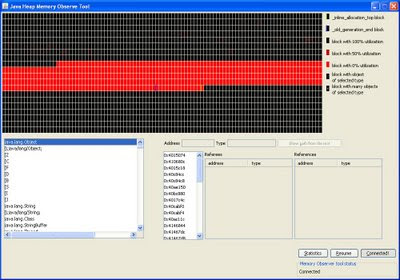
Now you press resume and run your application and try to recreate your memory problems. After that you press Pause in the memory tool. This will cause the tool to get a memory dump from your runing application. You will get a memory map at the top and at the bottom left a list of classes and primitives. You can select a class in the list and see what instances exist. It is however quite difficult to find information this way. Better is to use the statistics button. This will get you a window something like this:
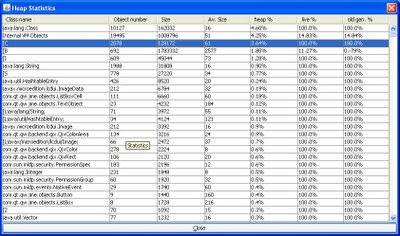
The data is:
The Java ME SDK 3.0 includes some tools for this. They are not available in the IDE but has to be started from the command line. So you open two command line windows. In the first you start your midlet:
cd C:\Java_ME_platform_SDK_3.0\bin
C:\Java_ME_platform_SDK_3.0\bin>emulator.exe -Xdevice:DefaultCldcPhone1 -Xdebug -Xrunjdwp:transport=dt_socket,suspend=n,server=y,address=51307 -Xdescriptor:[jadfile]
This should start the emulator with your midlet. I choose the DefaultDldcPhone1 which is configured to have 4 MB of heap. You can change that in the device properties if you want to.
In your second command window you start the memory profiler:
cd C:\Java_ME_platform_SDK_3.0\bin
memory-profiler.exe -host 127.0.0.1 -port 51307
This should open up the memory profiler window. You then press Connect to cennect to your emulator instance.This will take a while but then you get a window something like this:

Now you press resume and run your application and try to recreate your memory problems. After that you press Pause in the memory tool. This will cause the tool to get a memory dump from your runing application. You will get a memory map at the top and at the bottom left a list of classes and primitives. You can select a class in the list and see what instances exist. It is however quite difficult to find information this way. Better is to use the statistics button. This will get you a window something like this:

The data is:
- class name or primitive. a [ means 'array of'
- object number (or number of objects rather)
- size
- average size
- % of heap
- live %
- old generation %
Tuesday, April 28, 2009
Java ME SDK and SSL
I have been struggling a few days with getting Https communication to work in Java ME SDK 3.0, but with little success so far. To be able to create a Https connection I need to get the SDK to accept the (self-signed) certificate on my test server. The SDK does not however use the Java SE keystore but has its own (actually it has a lot of keystore's) with its own tool to update it. So far I have not managed to get my certificate into the right keystore. Tried asking on Sun's forum, but they don't seem to be interested in the problem at all.
So instead I used Nokia's S60 emulator, which gives me the option to accept the server certificate even though it can not be verified. Perhaps I should give up on the SDK for now, specially since the support and documentation is not really good enough.
So instead I used Nokia's S60 emulator, which gives me the option to accept the server certificate even though it can not be verified. Perhaps I should give up on the SDK for now, specially since the support and documentation is not really good enough.
Monday, March 16, 2009
Programming for BlackBerry with Java ME
Research in Motion BlackBerry phones support the Java ME standard, so for a Java ME developer is easy to get started on BlackBerry. But a few things do not work as expected...
Menu
The BlackBerry has a very consistent user interface, with a menu key and a back key. These keys can not be catched by your Java ME canvas, pressing them will not call the keyPressed() method as you might have expected. Instead the menu key will always open the menu. If you have not added Java ME commands to the Canvas, the BlackBerry will create a menu itself, with 'Close' as the only alternative. The back key will trigger the command with the command type EXIT if there is one and do nothing is there is no such command.
This basically means that you should always use Java ME Commands in yor BlackBerry application. There is no other way within the Java ME API to get the BB keys to work as expected.
Other keys
There are no Nokia-style softkeys on a BlackBerry keyboard. But there is a trackball (trackwheel on older models) and a qwerty keyboard.
The trackwheel sends Canvas UP, DOWN, RIGHT and LEFT codes and trackball press can also be handled and expected. Your application should probably use these keys a lot. Key repeat is however not supported, so if the user scrolls the trackball you will get a series of keyPressed events and no keyRepeated.
The qwerty keys will call keyPressed with codes as expected, you can use getKeyName. Just remember that some models have a smaller keyboard, with two characters per key. You will always get the first character.
The return, backspace and space keys will also deliver key events as expected. The shift and alt keys will however not. Instead they affect the keycode delivered to the application. That is ok for the qwerty keys, but also it means that you can not tell if the user is holding down shift and scrolling or pressing the trackball.
Fullscreen mode
You Java ME Canvas will always cover the full screen. The call to setFullScreenMode has no effect. This also means that the sizeChanged method will never be called. So you should make sure that your application does not depend on it beging called.
The conclusion is that the BlackBerry Java ME implementation is a good one, and can be very well be used as a base for your implementation on BlackBerry. But if your midlet is based on the Canvas class and developed for Nokia-style phones you will probably need to make some changes, mainly with menues, softkeys etc. You can them detect at runtime if the midlet is on a BlackBerry or not and adjust to that.
Menu
The BlackBerry has a very consistent user interface, with a menu key and a back key. These keys can not be catched by your Java ME canvas, pressing them will not call the keyPressed() method as you might have expected. Instead the menu key will always open the menu. If you have not added Java ME commands to the Canvas, the BlackBerry will create a menu itself, with 'Close' as the only alternative. The back key will trigger the command with the command type EXIT if there is one and do nothing is there is no such command.
This basically means that you should always use Java ME Commands in yor BlackBerry application. There is no other way within the Java ME API to get the BB keys to work as expected.
Other keys
There are no Nokia-style softkeys on a BlackBerry keyboard. But there is a trackball (trackwheel on older models) and a qwerty keyboard.
The trackwheel sends Canvas UP, DOWN, RIGHT and LEFT codes and trackball press can also be handled and expected. Your application should probably use these keys a lot. Key repeat is however not supported, so if the user scrolls the trackball you will get a series of keyPressed events and no keyRepeated.
The qwerty keys will call keyPressed with codes as expected, you can use getKeyName. Just remember that some models have a smaller keyboard, with two characters per key. You will always get the first character.
The return, backspace and space keys will also deliver key events as expected. The shift and alt keys will however not. Instead they affect the keycode delivered to the application. That is ok for the qwerty keys, but also it means that you can not tell if the user is holding down shift and scrolling or pressing the trackball.
Fullscreen mode
You Java ME Canvas will always cover the full screen. The call to setFullScreenMode has no effect. This also means that the sizeChanged method will never be called. So you should make sure that your application does not depend on it beging called.
The conclusion is that the BlackBerry Java ME implementation is a good one, and can be very well be used as a base for your implementation on BlackBerry. But if your midlet is based on the Canvas class and developed for Nokia-style phones you will probably need to make some changes, mainly with menues, softkeys etc. You can them detect at runtime if the midlet is on a BlackBerry or not and adjust to that.
Thursday, March 12, 2009
Java ME on BlackBerry
One of the platforms you can support with Java ME is BlackBerry. BlackBerry devices are a bit different from your ordinary cellphone. They are very good at email and includes a handful of applications.
Most of the applications for BlackBerry use the native Java API, but the device also supports Java ME midlet applications. But there are a few points to note...
Create COD files
BlackBerry supports standard jar/jad files to some extent, and installing your application entering a jad URL in the phones browser might work very well. But my experience is that sometimes it doesn't. Converting the jad/jar files to BlackBerry cod file format on your PC might be a better idea.
For this you need BalckBerry Java development tools. I use BlackBerry JDE 4.6.0, but there are new versions. You find them here.
From the command line you run something like:
This will take your yyy jar and jad files and create XXX.cod. It will also modify your jad file and add a lot of BlackBerry-specific lines to it. This makes the JAD file much larger, so will probably not want to use it for non-BlackBerry devices, even if the original data is still there (some devices have restrictions on jad file size).
If your midlet is large, it will be split into several cod files. They will all be in the yyy.cod, which might by a zip archive. So you need to check if it is (you can also check the modified jad file to see if there are several cod files in it). If it is you should unpack it and put the individual cod files on your web server together with the modified jad file. Make sure that the cod mimetype is configured on your web server, and your cod file is ready to install.
Most of the applications for BlackBerry use the native Java API, but the device also supports Java ME midlet applications. But there are a few points to note...
Create COD files
BlackBerry supports standard jar/jad files to some extent, and installing your application entering a jad URL in the phones browser might work very well. But my experience is that sometimes it doesn't. Converting the jad/jar files to BlackBerry cod file format on your PC might be a better idea.
For this you need BalckBerry Java development tools. I use BlackBerry JDE 4.6.0, but there are new versions. You find them here.
From the command line you run something like:
"C:\Program Files\Research In Motion\BlackBerry JDE Component Package 4.6.0\bin\rapc" import="C:\Program Files\Research In Motion\BlackBerry JDE Component Package 4.6.0\lib\net_rim_api.jar" codename=XXX -midlet jad=yyy.jad yyy.jar
This will take your yyy jar and jad files and create XXX.cod. It will also modify your jad file and add a lot of BlackBerry-specific lines to it. This makes the JAD file much larger, so will probably not want to use it for non-BlackBerry devices, even if the original data is still there (some devices have restrictions on jad file size).
If your midlet is large, it will be split into several cod files. They will all be in the yyy.cod, which might by a zip archive. So you need to check if it is (you can also check the modified jad file to see if there are several cod files in it). If it is you should unpack it and put the individual cod files on your web server together with the modified jad file. Make sure that the cod mimetype is configured on your web server, and your cod file is ready to install.
Monday, March 09, 2009
Portable Java ME development
The last six months or so I have been busy with developing a new application in Java ME environment. I have done some work in this envirnment before, but even though the platform has not changed much, my impression is that the quality of the implementations have improved a lot.
The goal was to support a wide selection of mobile phones:
- Nokia, both System 40 phones and Symbian System 60
- Research in Motion BlackBerry, at least the latest models like Bold and storm
- Sony Ericsson devices, where we started with Symbian UIQ models and now target mostly Xperia X1, based on windows mobile
- Samsung
- LG
- Motorola
etc...
Main focus is on more powerful, smartphone segment, but the application works well also on smaller phones.
Java ME was not the only possible choice. There is always the possibility to use native tools, for Symbian and BlackBerry at least. Our choice was to start developing on Java ME and see if it works and later add Symbian and/or BlackBerry specific code if needed. So far we have not needed it. And what surprises me is that it now works very well and very portable. When we try a new device it almost always works right away. We might need to add some code to make better use of the keyboard or make it look better, but generally it works well.
It is actually more of a problem to make it work in emulator, which surprises me. A special problem is with hasPointerEvents() method, which is supposed to tell us if the device has a touch screen or not. Since the application changes its user interface slightly depending on if there is a touch screen available or not this is a very important method for us. And on the phones it always works, but in the emulator it does not.
Another problem with the emulators is to find a good-looking emulator for demonstration purposes. There are a lot of good devices out ther, like Sony Ericsson Xperia X1 and Nokia S60 phones, but I have not managed to find good emulators for them. For the X1 I have so far not found a Java ME emulator at al, and for S60 phones there is one, but it does not look good enough for demonstration puposes. Guess this is because the development of new devices is so fast that manufacturers don't have the time to fix emulators.
The goal was to support a wide selection of mobile phones:
- Nokia, both System 40 phones and Symbian System 60
- Research in Motion BlackBerry, at least the latest models like Bold and storm
- Sony Ericsson devices, where we started with Symbian UIQ models and now target mostly Xperia X1, based on windows mobile
- Samsung
- LG
- Motorola
etc...
Main focus is on more powerful, smartphone segment, but the application works well also on smaller phones.
Java ME was not the only possible choice. There is always the possibility to use native tools, for Symbian and BlackBerry at least. Our choice was to start developing on Java ME and see if it works and later add Symbian and/or BlackBerry specific code if needed. So far we have not needed it. And what surprises me is that it now works very well and very portable. When we try a new device it almost always works right away. We might need to add some code to make better use of the keyboard or make it look better, but generally it works well.
It is actually more of a problem to make it work in emulator, which surprises me. A special problem is with hasPointerEvents() method, which is supposed to tell us if the device has a touch screen or not. Since the application changes its user interface slightly depending on if there is a touch screen available or not this is a very important method for us. And on the phones it always works, but in the emulator it does not.
Another problem with the emulators is to find a good-looking emulator for demonstration purposes. There are a lot of good devices out ther, like Sony Ericsson Xperia X1 and Nokia S60 phones, but I have not managed to find good emulators for them. For the X1 I have so far not found a Java ME emulator at al, and for S60 phones there is one, but it does not look good enough for demonstration puposes. Guess this is because the development of new devices is so fast that manufacturers don't have the time to fix emulators.
Thursday, October 16, 2008
LWUIT first impressions
Last week or so I have been working with the Leight Weight UI Toolkit for Java ME. We started with drawing everything by hand using Java ME LCDUI and Canvas class, but we feel that this is not viable in the long run. We want a toolkit that gives us a higher level API and handles differences between different devices.
Impressions so far are good. It was some work converting our application for Lcdui to Lwuit, but less than expected. Performance is OK, our main problem is network traffic, which has nothing to do with Lwuit, but the toolkit does not seem to slow it down, possible even speeding things up a little (since our old interface repainted the whole screen a bit too often). We haven't really used much of the visual goodies of the toolkit yet, and that is not our main reason for using lwuit, but surely we will use them eventually.
Lwuit is inspired by Swing. In my opinion they follow Swing a bit too close. I don't really see the need for Layout Managers on these very small devices. Our layout in our main screen is position based and needs a scrollable canvas, which lwuit gives us. So far we use the (undocumented) CoordinateLayout, which seems to work as expected, possibly we will have to implement our own, but since we don't want the LayoutManager to ever move the objects and set the X and Y coordinates ourselves, it shouldn't be too difficult.
Handy features, like drawing a text centered or making a dotted line, that exist in Lcdui are not available in Lwuit for compatibility with Swing. We used both these features in our interface, so we had to modify Lwuit so that we can use them, which was not difficult. We don't really see that compatibility with Swing is important, since the interface is designed for mobile devices with small screens and limited keyboards and possibly touch screen.
Impressions so far are good. It was some work converting our application for Lcdui to Lwuit, but less than expected. Performance is OK, our main problem is network traffic, which has nothing to do with Lwuit, but the toolkit does not seem to slow it down, possible even speeding things up a little (since our old interface repainted the whole screen a bit too often). We haven't really used much of the visual goodies of the toolkit yet, and that is not our main reason for using lwuit, but surely we will use them eventually.
Lwuit is inspired by Swing. In my opinion they follow Swing a bit too close. I don't really see the need for Layout Managers on these very small devices. Our layout in our main screen is position based and needs a scrollable canvas, which lwuit gives us. So far we use the (undocumented) CoordinateLayout, which seems to work as expected, possibly we will have to implement our own, but since we don't want the LayoutManager to ever move the objects and set the X and Y coordinates ourselves, it shouldn't be too difficult.
Handy features, like drawing a text centered or making a dotted line, that exist in Lcdui are not available in Lwuit for compatibility with Swing. We used both these features in our interface, so we had to modify Lwuit so that we can use them, which was not difficult. We don't really see that compatibility with Swing is important, since the interface is designed for mobile devices with small screens and limited keyboards and possibly touch screen.
Thursday, August 21, 2008
Error preverifying class - java/lang/NoClassDefFoundError: java/lang/Object
Is an error you might see when preverifying your midlet. Basically the problem is that the verifier can not find the referenced classes - and if it complains about java.lang.Object it basically can not find anything.
We had this today, and the reason was that our tool (IntelliJ) generated a not so good ant file, with the classpath for the jre. That is not what the preverifier expects. Rather it should be something like:
-classpath C:\WTK2.5.2\lib\cldcapi11.jar;C:\WC:\WTK2.5.2\lib\midpapi21.jar
We had this today, and the reason was that our tool (IntelliJ) generated a not so good ant file, with the classpath for the jre. That is not what the preverifier expects. Rather it should be something like:
-classpath C:\WTK2.5.2\lib\cldcapi11.jar;C:\WC:\WTK2.5.2\lib\midpapi21.jar
From applet to MIDlet
We have started to look into making a mobile client. Our current approach is to make a JME client, partly based on our existing Java client, based on Java SE and Swing and runnable as an applet or a standalone application. The rendering part will need to be rewritten but we hope to be able to reuse communication with the server and some of the internal logic.
Items we found so far:
Items we found so far:
- we use both socket and http communication. Both need to be rewritten to use the microedition Connector. So far the changes are small, but we will need to keep different classes for Java ME and SE versions
- we use gzip, in the SE version java.util.GZIPInputstream which is not included i Java ME
- enums is a big problem, looks like we will have to convert those used to old-fashioned int and classes with constant definitions.
- minor problems like String.split() (no such method in JME, and no StringTokenizer either) needs to be solved.
Subscribe to:
Posts (Atom)